

A practical guide to Segway’s new-subscriber coupon, eligible eKickScooter products, exclusions and the store steps that matter before checkout.
Segway’s US store advertises a sign-up coupon for shoppers buying a whole eKickScooter. The useful question is not simply whether a coupon exists. It is whether the product in your basket qualifies, whether your account is set up correctly, and whether the offer still appears in the terms shown at checkout.
We have focused this guide on the store’s stated conditions and on a few concrete Segway pages that help explain the range. The store’s current price, inventory, shipping coverage and offer wording should always be checked on the live product page before an order is placed.
Disclosure: this post includes affiliate links, and we may be paid a commission on purchases made through them.
The short version
- The offer is a sign-up coupon for whole eKickScooter products on the Segway store.
- A new subscriber or store account is required before the coupon can be used.
- Accessories, replacement parts and kids scooters are listed as exclusions.
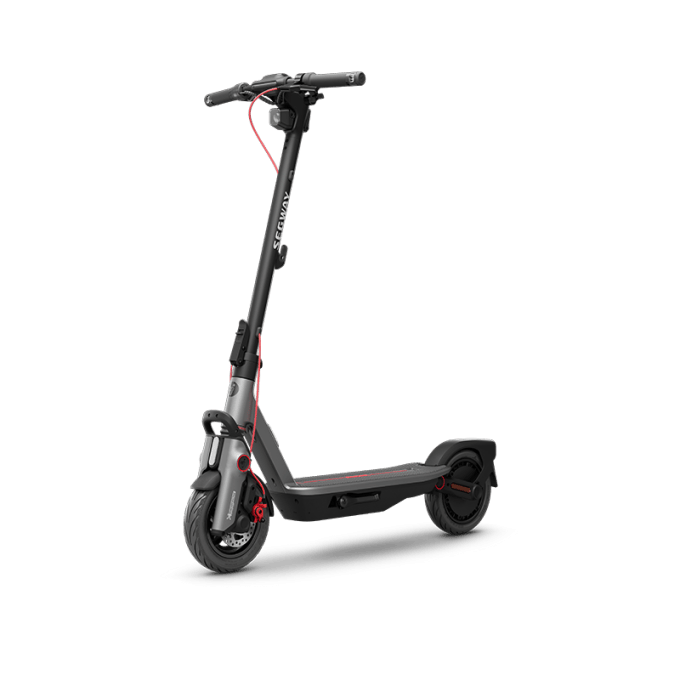
- The Ninebot MAX G3 and Ninebot F3 are the most relevant pages to inspect for an adult eKickScooter purchase.
What the offer is
Segway presents the promotion as a welcome benefit for people who sign up to its store communications or create the required account. The store copy says the coupon applies to whole eKickScooter products. That wording matters: it points to a complete ride rather than a charger, basket, mirror, fender or other add-on.
The offer is therefore best understood as a product-level coupon, not a blanket reduction across the store. It does not automatically make every Segway product eligible. A basket containing a qualifying scooter and excluded accessories may need to be checked carefully, because the discount treatment can depend on the eligible line item and the terms displayed during checkout.
- Benefit: a welcome coupon may reduce the cost of a qualifying complete eKickScooter.
- Entry point: sign up or sign in through the Segway store before applying it.
- Scope: the offer is tied to whole eKickScooter products.
- Verification: the product page and checkout should show whether the code is accepted.
Because coupon conditions can change, we would treat the live Segway offer page as the final source of truth. The affiliate link below takes readers to the store, where the current eligibility language can be checked alongside the product selection.

→ Compare eligible Segway scooters
Who benefits most
The clearest beneficiary is a new Segway shopper who already intends to buy a complete adult eKickScooter from the US store. That reader can use the offer as one part of the purchase decision, alongside range, riding position, portability, local rules and delivery availability.
The Ninebot MAX G3 is a useful page to inspect if the priority is a larger commuter-style scooter with a more substantial specification set. The Ninebot F3 gives shoppers another adult eKickScooter route to compare. We are not treating either as automatically eligible; the point is to check the exact product page and basket treatment.
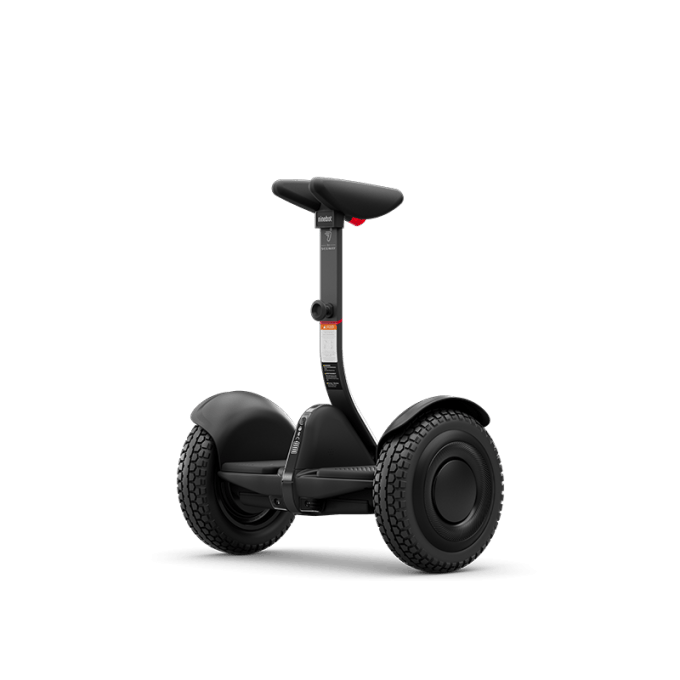
The offer is less relevant if your planned purchase is an e-bike, self-balancing scooter, go-kart or replacement part. The Segway Xyber Electric Bike, for example, is a different vehicle category. The Ninebot S2 is a self-balancing scooter, so neither should be assumed to qualify simply because it is sold by Segway.
Restrictions to check
The store specifically excludes accessories, parts and kids scooters from the sign-up coupon wording. That makes the product category more important than the brand name. The C2 Pro, for instance, is presented by Segway as a kids scooter, so it should not be treated as an eligible substitute for an adult eKickScooter.
There are also practical checks that are easy to miss. The coupon may be connected to the account that received it, the code may need to be entered in a particular checkout field, and a product can become unavailable before an order is completed. The store also publishes shipping and returns information, which is worth reading for a larger or more specialized vehicle.
- Confirm that the item is a complete adult eKickScooter, not an accessory or part.
- Make sure the sign-up or account step has been completed using the account intended for the order.
- Read the live coupon terms for exclusions, combinations and any channel limitations.
- Check that the reduction appears in the order summary before payment.
- Review shipping, returns and regional restrictions for the exact product.

How to use it
The redemption path should be simple, but following the order of operations reduces avoidable checkout errors. Start from the official Segway store, review the offer wording, and then open the product page for the scooter you actually want.
- Open the offer: follow the store link and read the current welcome-coupon conditions.
- Create or access the account: sign up or sign in as instructed by Segway.
- Choose the product: verify that the complete eKickScooter page is not in an excluded category.
- Apply the coupon: use the code or account-linked benefit in the store’s checkout flow.
- Confirm the basket: check the eligible line item, discount treatment, shipping details and return terms.
If the coupon does not apply, do not assume the store has made an error. First check the product category, account status, spelling of the code, exclusions and current stock. A mixed basket can also make the result harder to read, so checking the scooter on its own may clarify which line is eligible.
What to compare before checkout
A coupon is useful only if the underlying product fits. Before treating the welcome benefit as the deciding factor, compare the specifications and practical ownership details shown on the relevant Segway page.
- Ride use: commuting, short recreational trips and private-property use can call for different designs.
- Portability: check the product’s weight, folding design and storage needs.
- Range context: treat the listed range as a published estimate and allow for rider weight, terrain, temperature and riding style.
- Safety and legality: confirm local rules, protective equipment needs and where the scooter may be ridden.
- After-sales support: read warranty, service and return information before ordering a large vehicle.
For a straightforward adult eKickScooter comparison, start with the Ninebot MAX G3 and Ninebot F3 pages. For a different use case, the Segway Xyber Electric Bike and Ninebot S2 show why the store’s range should be filtered by vehicle type first.
Can the coupon be used on accessories?
Segway’s store wording excludes accessories and parts. Check the current coupon terms and basket summary rather than assuming an accessory inherits the treatment from an eligible scooter.
Does the offer apply to kids scooters?
The store lists kids scooters as excluded, so a model such as the C2 Pro should not be treated as eligible. Use the live product and coupon pages for the final confirmation.
What if the code does not work?
Check the account or sign-up requirement, product category, code entry, stock status and exclusions. If those checks do not resolve the issue, use Segway’s store support route before placing the order.
Our take
Segway’s sign-up offer can be useful for a new shopper who is already choosing a complete adult eKickScooter. Its main limitation is its narrow scope: it is not a store-wide benefit, and accessories, parts and kids scooters are excluded in the published wording.
We recommend choosing the ride first, then checking the coupon against that exact product and account. That keeps the offer in its proper place: a possible saving on a suitable Segway purchase, not a reason to select the wrong vehicle category.